
StarShare IPTV in Dubai
For a 7:30 p.m. Mumbai listing on 19 November 2026, use 6:00 p.m. in Dubai and 7:00 p.m. in Karachi. Check the broadcast edition and commentary separately.
Which feed are you watching?
Write the country where the screen is used, then the language and station edition. A viewing location and a channel’s origin answer different questions.
A Mumbai evening on a Dubai screen
Illustrative programme times, calculated for the stated dates. Use the organiser’s current schedule for an actual fixture.
| Viewer’s city | 2026-07-16 at 14:00 UTC | 2026-11-19 at 14:00 UTC |
|---|---|---|
| Dubai | Thu 16 Jul, 18:00 | Thu 19 Nov, 18:00 |
| Mumbai | Thu 16 Jul, 19:30 | Thu 19 Nov, 19:30 |
| Karachi | Thu 16 Jul, 19:00 | Thu 19 Nov, 19:00 |
| London | Thu 16 Jul, 15:00 | Thu 19 Nov, 14:00 |
| Toronto | Thu 16 Jul, 10:00 | Thu 19 Nov, 09:00 |
Sources · IANA time zone database
Inside STAR TV
Follow the highlighted row
Ask about the audio while it plays
The grid identifies a channel and time slot. Listen to the programme and inspect the available audio and subtitle choices in your installed build.
Start with the screen you will actually use
If you live in Dubai and want to try Hindi or Urdu viewing, start by identifying the player for your screen. Install the appropriate player, then ask StarShare on WhatsApp for the one-day free trial. Tell support you are watching in Dubai, which device you have and which programme, feed or language track you want to test. Plans are priced in US dollars. A month is USD 6.99, while the full twelve-month term is USD 39.99.
Two people can ask for “the Indian channels” and mean different things. One wants a news bulletin with Hindi speech. Another wants to hear the original English commentary on a particular cricket match carried by an Indian feed. A third may want a Pakistani drama with English text for a family member who understands less Urdu. Start with the programme and the experience you want when you press play. It gives the person answering a concrete question.
Keep two small details together throughout setup. The account will be used in Dubai, and the player will run on a particular device. Your eldest child may have installed an app on an iPhone while your parents expect to watch on a Samsung television. Success on the phone gives everyone a useful starting point. There is still a separate question about the TV's operating system, its store and its controls. Make that second screen the priority if it will be the one the household pays to use.
A good first message might read, “I watch in Dubai on an Apple TV box. I can give you the model. I would like to test a Hindi-speaking news programme and Urdu commentary for a fixture if that edition is available here. Which player should I install?” The message says how to help. It contains no account password, full home address or payment details. You can use Arabic or English for the interface and still ask for a programme in another language.
Convert an India listing into a Dubai evening
Imagine a schedule that explicitly says Thursday 19 November 2026 at 7:30 p.m. in Mumbai. Treat it as a worked example rather than a real match announcement. Mumbai uses the Asia/Kolkata rules. On that date it is five hours and thirty minutes ahead of UTC. Subtract that offset from 19:30 and you get 14:00 UTC. Dubai is four hours ahead of UTC, which puts the example at 18:00, or 6:00 p.m. local time. A friend following from Karachi gets 19:00, or 7:00 p.m.
The half hour is where mistakes usually start in this example. Typing 19:30 into a tool labelled “UTC” asks a different question. It tells the converter the event begins at 19:30 UTC and yields 23:30 in Dubai. The arithmetic can be perfectly accurate while the input is wrong. Copy the zone printed by the schedule along with the date and start time. When an organiser lets you choose a city, check which city is selected before doing any subtraction yourself.
A screenshot from a friend is harder to interpret than a schedule link. Their phone may already have converted the listing to its own clock. Ask what exact time-zone label appears on the page. “It says 7:30 on my screen” leaves two possibilities open. “It says 7:30 p.m. India Standard Time on Thursday” is much better. If a schedule explicitly says local time at the ground, check the location of the ground. The country printed on a team's shirt does not set the venue clock.
Here is a quick way to catch a reversed calculation. Dubai is behind Mumbai on this example date, so the Dubai clock must show an earlier number for the same instant that evening. If your answer is 9:00 p.m., you have moved in the wrong direction. The difference from Karachi is one hour in this illustration. Keep the arithmetic with the original listing so that somebody reading your message can repeat it. You do not need to change your television clock to follow an overseas schedule.
When the date changes
Consider a second illustrative listing, Friday 20 November at 00:15 in Mumbai. That is 18:45 UTC on Thursday 19 November. In Dubai you would set a reminder for 22:45 on Thursday, or 10:45 p.m. The date printed by the organiser is Friday, while the date on your Dubai reminder is Thursday. A guide search for Friday evening could take you almost a full day past the intended programme.
The request “Friday's late match” is especially easy to misread in a family chat. Someone in Mumbai may be referring to the first few minutes of Friday. Someone in Dubai may be thinking about the end of Friday night. Use the two dates next to their cities. “Mumbai, Friday just after midnight. Dubai, Thursday at 10:45 p.m.” A person can then search the programme grid on the right evening, even if the app uses a twelve-hour clock and the source uses twenty-four hours.
A listing can refer to several moments on the same evening. A studio preview may begin before coverage from the ground. The toss, scheduled start of play, first ball and programme end can each have separate entries. Even after a correct conversion, two published times can differ because the labels describe different things. Write down the event attached to the time. If your aim is to hear a pre-match discussion in Urdu, the first-ball time alone will not tell you when to turn on the screen.
For a dated event, return to the organiser or the broadcaster's current schedule before setting the final reminder. Weather, venue changes and programming decisions may alter the listing. A time conversion translates the instant you give it. It cannot identify a rescheduled fixture or tell you whether the current StarShare account has authorised access to that event in Dubai. Ask about that separate point using the date, competition, teams and preferred commentary.
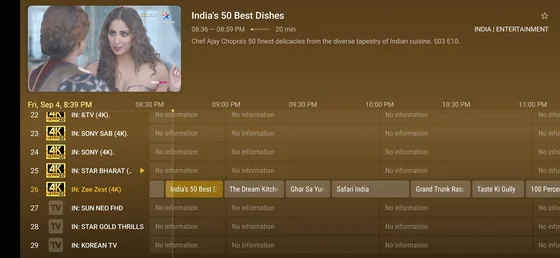
Read a STAR TV programme grid
Look at the STAR TV guide image on this page. The times run horizontally across the grid. The numbered rows on the left contain channel names. The selected row displays a strip of programme blocks, while several neighbouring rows say “No information.” There is enough information here to demonstrate how to read that screen. It is an earlier example of the interface. The clock, programme titles and row numbers in it are unsuitable as a current Dubai schedule.
The highlighted programme has a title and a time span in the information area. Read that area after you select the cell you care about. A vertical time marker and the left edge of a programme cell need not coincide. One is a position on the time axis. The other marks where a particular listing begins. If the highlighted programme began several minutes before the current time, it is normal for the two to sit apart.
A single filled row beside empty ones is a useful observation. It tells you the grid can display programme entries. It leaves open several explanations for the rows without listings. The relevant programme data might be missing, a channel may have a different identifier from the guide's identifier, or that particular time window may have no schedule information. Try opening one permitted row that has no listing. Record separately whether the picture plays and whether the programme grid shows text.
Suppose the picture plays in Dubai and the grid remains empty. A support note such as “The row opens and I can hear it. The cells from 6:00 to 7:00 p.m. Dubai time say No information. The row immediately above has listings” is more useful than “TV broken.” There are now two concrete observations to investigate. Reinstalling the player at this point could erase a working login while leaving the missing guide entry exactly as it was.
If the player version on your screen has a different layout, use the labels you can actually see. The screenshot does not establish a menu path for changing the guide offset. Check the device clock, the zone named in the source schedule and one independently known start time first. If you find a guide offset control in your version, record its original value before changing it. Keep the programme and date fixed while you compare the result.
Tell a clock error from a feed mismatch
A useful clue is whether the error follows the clock or follows one channel. Imagine that a source listing converts to 6:00 p.m. in Dubai but a player appears to show 7:30 p.m. for the same item. That ninety-minute gap is consistent with reading an India clock as a Dubai clock. It is a hypothesis you can test. Check a second identifiable programme listed in the same source zone. Look for the same gap across the two entries before adjusting the whole guide.
A different pattern calls for a different question. Suppose most rows line up, but one has a film where a news programme should be. A global offset would move all the good rows too. Write down the name and suffix of the affected feed. Regional editions, time-shifted feeds and similarly named services can be close enough to confuse a menu search. A row with “HD” in the name is also a different search result from a row that lacks it, even where both use the same station logo.
Look at the programme before and after the disputed entry. If all three titles belong to the right channel but every time is displaced by a fixed amount, the time interpretation deserves attention. If the surrounding titles belong to another edition throughout the evening, the feed mapping deserves attention. If the titles before and after look right and only one entry is wrong, a late schedule update is another possibility. These patterns give support a shorter list of things to inspect.
Do not use the delay between two live screens as a substitute for a schedule comparison. An internet stream may arrive later than another delivery path, and two app sessions may start from different positions. Seeing a goal seconds later on your TV says little about whether the programme guide has applied the correct time zone. An offset of hours and a delay of seconds are different observations. Give each its own measurement and describe how you obtained it.
Ask specifically for Hindi or Urdu speech
Start with the language that comes out of the speakers. Ask for Hindi speech if that is what your household wants to hear. For a match, identify the commentary language. For a drama, say whether you want the original performance or a dub. If the person answering suggests an English menu setting, explain that the menus are already readable and the question concerns the sound while the programme is playing.
A player may remember an audio preference across sessions. That preference can select a matching track when one is present. It cannot add a new recording to an edition that contains only one audio track. Check during the actual programme you are interested in. Trailers, advertisements, studio segments and the main feature can use different audio arrangements. Note the segment and minute at which you listened so that a follow-up can examine the same point.
Some language labels are more specific than others. An entry might show an English-language name, a language tag, a track number or “unknown.” If you have permission to try it, listen briefly and write down what you hear. A track titled “2” could be a second language, a descriptive narration or a different mix. Guessing from the order of the list is a weak basis for purchasing a year. Say when the only evidence you have is a menu label.
Families often have different needs on the same sofa. One person may follow Hindi dialogue comfortably while another wants English subtitles. Ask for those together. If Hindi audio is present but English subtitles are absent, the trial has answered half the question. The next decision may be to ask for a different authorised edition of that title or to choose another programme for that evening. It does not follow that every title will have the same combination.
For a help request, “Urdu commentary missing” benefits from one extra sentence. For example, “On the Dubai television, the commentary during play is English. I opened the audio list during the second over and it offered one track. The studio introduction had been in Urdu.” That describes something a person can compare. It also distinguishes a switch during the broadcast from a mistaken subtitle preference in the player.
Separate subtitles, captions and the interface
Subtitles supply text alongside the picture. Captions may carry additional information such as who is speaking or a sound cue. Availability depends on the programme, edition and player. When you ask for Urdu, specify whether you want Urdu audio or written Urdu, and whether an English subtitle would also be useful. A screenshot of an Urdu search result establishes the spelling on the screen. It cannot establish what the programme sounds like.
Written Urdu can introduce a separate display issue. Look at a complete sentence on screen. Letters should join where appropriate, text should read in the expected direction and punctuation should sit in a sensible place. If a line of Urdu is broken into disconnected shapes, a screen photo of just that line can help identify a rendering problem. Crop out the rest of the account. Describe whether the words appear in the player menu, in the programme picture or in a selectable subtitle layer.
There is a practical difference between text drawn permanently into the picture and a selectable track. If the player lets you turn one subtitle track off and a second line stays on screen, the remaining line might already be part of the picture or a different overlay. Repeat with the same scene and write down which line disappears. A request to enlarge selectable captions is easier to answer when everybody understands which text the control can affect.
Try a sentence on your actual Dubai television from the seat where you normally watch. A subtitle can look clear on the phone used during setup and still be difficult to read across the room. Check the bottom of the image, where a television's picture scaling or an overlay may cover a line. If a menu offers size or contrast changes, make one change at a time and return to the same shot. Record the combination your family can read.
The STAR TV guide image identifies programmes and channels. It shows no audio-track selector or subtitle-language menu. Use the image to recognise the guide and find a programme. For a precise control sequence, obtain the instructions for the build installed on your own device. If your screen offers a speaker icon and a separate speech-bubble or caption button, inspect the label that appears when you focus each one. Icons without a text label are easy to interpret differently.
Identify the television, the box and the app store
Start at the screen where you choose apps. If a small box is connected to an HDMI input, the box may be providing the whole home screen. The model printed on the television bezel identifies the display. It says little about the software running on the separate box. Write down which remote takes you to the app library. It is an easy detail to discover before you send your first message.
For an Apple TV box in Dubai, use Apple's documented model check. Open Settings, General, then About and read the model number. You can also find a model identifier on the underside of the box. Keep the model number and leave the serial number out of your public messages. Apple's model guide can distinguish an Apple TV HD or a generation of Apple TV 4K from an older unit that looks similar on a shelf.
Apple documents an App Store on Apple TV HD and Apple TV 4K. The third-generation Apple TV does not offer that App Store. Apple's list of media services also includes an App Store for the United Arab Emirates. These facts answer whether a store route exists for the platform and market. You still need the exact player listing, developer and device compatibility. A similarly named phone application is poor evidence that a matching tvOS application is available to your account.
The country or region associated with the store account is another detail to record. A household living in Dubai may use a store account established somewhere else. If a listing is absent, give support the device model and the region currently selected. Changing an established account's country has consequences for its existing purchases, balance or subscriptions. Use the device and region evidence to narrow the search before considering any account changes.
For a television with a built-in app store, ask the same question in that store's terms. Identify whether a Samsung set runs Tizen, whether an LG set runs webOS, or whether the home screen is provided by a Google TV device. The enclosure and screen size do not settle that question. A file intended for Android should not be treated as a universal installer for every TV. Ask which verified route matches the hardware you have in front of you.
Install, then request the one-day trial
The StarShare trial begins with a conversation after you have the appropriate player installed. Send a short message to the published WhatsApp number, +44 7532 814802, asking for the one-day free trial. Keep the UK country code even when writing from Dubai. The published flow does not specify that simply opening the chat starts a clock. Ask the person arranging the trial when your access starts and when it ends.
Pick a trial window that includes the use you care about. If your household watches a drama after dinner, ten minutes spent opening a player at lunchtime will establish only that the software opens. Ask whether the trial can cover your planned evening. If a particular match is the reason for the enquiry, give its official date and competition before relying on it as the test. A trial cannot demonstrate a future event that never occurs during its active period.
Prepare one ordinary programme as a comparison alongside the special request. If a news feed plays while one sports listing is empty, that narrows the issue. If neither opens and the player returns an account error, the next question concerns the account or its login method. If both pictures open but only one has the requested commentary, you have found an edition-level difference. Three short observations communicate more than a long description of a failed evening.
Record the first successful action. Perhaps the player opened, accepted the issued details and showed channel names. That gives you a point to return to if playback then fails. It also lets support distinguish a login problem from a feed that has no guide data. Use your private conversation for instructions specific to the account. Keep passwords, playlist URLs, portal addresses and access tokens out of any screenshot you circulate.
The genuine STAR TV sign-in image shows separate username and password fields, plus options labelled “Include TV channels” and “Include VOD.” It does not show a completed account or the contents of those categories. Selecting a category in a player is different from receiving permission to view a particular item. If your installed build presents a different login form, ask which method was issued for that installation instead of entering the same details into every field.
Decide whether the retail price fits
The four retail totals in this guide apply to the whole term in USD. The one-month option is USD 6.99, three months are USD 14.99, six months are USD 27.99 and twelve months are USD 39.99. Read the term next to the price before opening an enquiry. Dubai residence does not turn a dollar figure into an amount in dirhams. Ask for the final payable currency and any applicable charges before agreeing to an order.
Suppose you will be in Dubai for roughly a quarter and have already tested the family television. Three separate one-month terms at the listed totals would add up to USD 20.97. The published three-month total is USD 14.99, a difference of USD 5.98 in that comparison. That helps price the duration. It says nothing about what happens to unused time if you leave early, whether a term transfers with you or whether you can watch from another country.
If you travel regularly between Dubai and Karachi, ask about the account terms for that situation directly. A country selector on a guide changes the information you are reading. It does not modify an active account, establish permission to use a subscription in a second country or increase simultaneous connections. Describe whether different family members will use two screens at once and whether they will be in the same location. Those are separate questions.
Some households value a shorter decision more than the lowest average monthly equivalent. If the living-room television is due to be replaced or an essential audio combination was absent during the trial, a long commitment may not solve the problem. The relevant comparison is between what the current tested setup delivers and the upfront amount. Keep the outcome of the trial beside the plan name so that the order matches the reason you wanted the service.
Open the plan page to check the total, then follow the enquiry action. The order page prepares a WhatsApp message identifying your selection. Until you choose to send that message and agree the terms with support, you have simply prepared an enquiry. A price on the website is valuable because it puts the same starting number in front of both parties. Keep a copy of what was agreed, including the dates and the account to which it applies.
Record a problem without losing the working setup
A useful support note has a time, a screen, a source and a symptom. “Dubai, Thursday 19 November at 6:10 p.m. The programme grid showed a scheduled title on the selected row, but opening that row returned to the guide. Another row played on the same TV.” All four details help. They establish a comparison kept on one device, and they do not expose the account used to run it.
If the image freezes, watch what the menus do. Can you return to the guide using the remote? Does the audio continue while the picture stops? Does a loading symbol appear, or does the whole application stop responding? Each observation changes the next test. A silent frozen frame and a responsive channel list have a different shape from a television that ignores every remote button, including its own settings control.
Try the nearest safe comparison you can make. Keep the player, screen and home connection fixed and open a different permitted item. Then return to the original one. If other items work, note the exact feed and time before altering your home network. If everything in the app fails while another service works on the same television, mention that comparison too. It narrows the symptom without proving which operator is responsible.
When the timing of the problem matters, include a local date as well as a clock reading. A message sent at 12:05 a.m. about something you saw ten minutes earlier spans two dates. Giving both dates avoids a fruitless search through the next day's programme grid. If you supply a second city's time for a relative helping you, identify each city in full. Keep Dubai as the local reference for this television.
Pictures should show only what the person helping needs. On the guide screen, crop to the row name, the relevant time columns and the programme entry. On a sign-in form, describe the label of the field instead of photographing the value you entered. On a device information screen, the product model can be useful, while a serial number or personal account email seldom adds anything to a first enquiry. Review the cropped file before sharing it.
A Dubai viewing plan you can hand to a family member
Leave a short note with the person who will actually use the television. Give the name of the HDMI input or the built-in app, the app icon they should expect, the navigation step that takes them back to the guide and the agreed support contact. Keep login details separately. This matters when one family member arranged everything from a phone and another is trying the remote for the first time on match night.
Build a small personal programme list by purpose. For example, use one news bulletin with speech the viewer recognises, one drama with a subtitle they can read, and one event with a published schedule and the commentary they requested. Save the exact row names you tried. The news bulletin becomes a quick playback check. The drama checks the preferred language combination. The event tests the clock conversion and the availability question together without confusing them.
Allow time to test returning to a programme. Close the playback view, reopen the guide, select a different item and come back. Ask the viewer to do this with the remote themselves. If they return to a different feed with a similar logo, save the full label in the note. The ability to recover from a wrong button matters more during ordinary use than knowing every setting available in an unfamiliar app.
A useful close to the trial is a clear sentence about the outcome. “The Dubai living-room TV played the programme with Hindi speech and English subtitles. The guide time agreed with the converted listing. We have not yet seen the particular Urdu commentary edition.” That leaves a short, answerable question for support. It is also a sound basis for choosing whether to enquire about a paid term, keep testing another device or wait for better evidence about the programme your household cares about.
A shared reminder for Dubai, London and Toronto
Consider a Dubai family arranging to talk to relatives in London and Toronto during the same programme. Use the November illustration from earlier, 14:00 UTC on Thursday the nineteenth. The television in Dubai should show 6:00 p.m. for that instant. London is on Greenwich Mean Time for this example and shows 2:00 p.m. Toronto is on Eastern Standard Time and shows 9:00 a.m. The event has one start, even though the household messages contain three different clock readings.
Now take an illustrative date in summer, 16 July 2026, also at 14:00 UTC. Dubai still reads 6:00 p.m. London reads 3:00 p.m. and Toronto reads 10:00 a.m. A family who remembers the November difference and applies it to July would send the wrong local reminder to both relatives. City and date together resolve the apparent disagreement. A saved offset typed into the title of a permanent chat group will gradually become misleading.
If you create the invitation in a calendar, assign the event a real time zone and check what the invitation shows on another device. A floating appointment that simply says “6 p.m.” might be interpreted as six in each viewer's local zone. Ask one relative to read the converted time back to you with their city. If it matches the worked example, the invitation has at least passed that particular check. Confirm the underlying official start again if the organiser updates its schedule.
Do the same for a programme replay when it has a separate advertised start. A recording, catch-up window and scheduled repeat are three different arrangements. If relatives can see yesterday's programme in their own app, that observation does not establish an equivalent replay option for your Dubai household. Ask whether you are comparing a live feed, a dated repeat on that feed or a separately available on-demand item. It explains why pressing play at the same instant might produce different programme positions.
A visitor's device and a resident's device
A friend visiting Dubai may bring a phone with an app already installed. It can be tempting to treat that phone as the fastest test of a television subscription. First decide whose question you are answering. The visitor wants to know what their phone can do during the visit. The resident wants to know whether a living-room screen is usable through a longer subscription term. The two trials might share a room and an internet connection but establish very different things.
If you try sending a picture from the phone to a television, identify what the television actually receives. Screen mirroring may show the whole phone interface. A casting session may hand playback to a compatible receiver. A native television player opens from the television's own app launcher. Note which controls still work when the phone screen goes dark and which remote returns to the programme list. Describe the observed behaviour without assuming all phone-to-TV methods work the same way.
Before using a temporary or shared screen, think about how you will leave it. See whether the player offers a sign-out option you understand. Keep the original household setup intact if the screen belongs to somebody else. When you finish, return to its normal input and check that your account is no longer available to the next person using that device. If you cannot identify the account or the sign-out route, use your own screen for the trial.
In a rented apartment, the remote may operate an external box hidden behind the television. A useful first observation is the name visible on the start screen before any viewing app opens. The apartment's Wi-Fi name and television brand are poor substitutes for that information. If a property manager supplied the device, ask which changes guests are allowed to make before installing software. Nothing in the StarShare order process requires altering somebody else's hardware for an initial enquiry.
Keep the evidence attached to the decision
Imagine the family has reached the end of its trial. It has a good picture, the Dubai clock is correct and the remote is easy to use. It still has two open questions about the intended subscription. Can two people watch at once, and which Urdu commentary edition will be available for a specific fixture? Put both questions in writing before selecting a long term. Neither answer follows from a successful single-screen playback test.
Once you have a reply, keep the exact plan page and the description of the accepted setup with your own records. Someone returning to the discussion several weeks later should be able to tell whether the agreement concerned one box in Dubai, a second television, a travelling phone or a particular tested account. Store any private account materials separately from the family viewing note. A short record that identifies the device, time, programme and outstanding question is easier to use when the next important evening comes around.
Device, account and regional references
Sources · Find your Apple TV model · Apple TV App Store guide · Apple media services by country · IANA time zone database
UAE plans and account questions · Middle East viewing times